5 Flagship AI Engineering Projects
Build a complete enterprise AI platform from scratch across 10 months. Step-by-step roadmap covering self-hosted inference, MCP security, agentic DevOps, FinOps, and EU AI Act compliance.
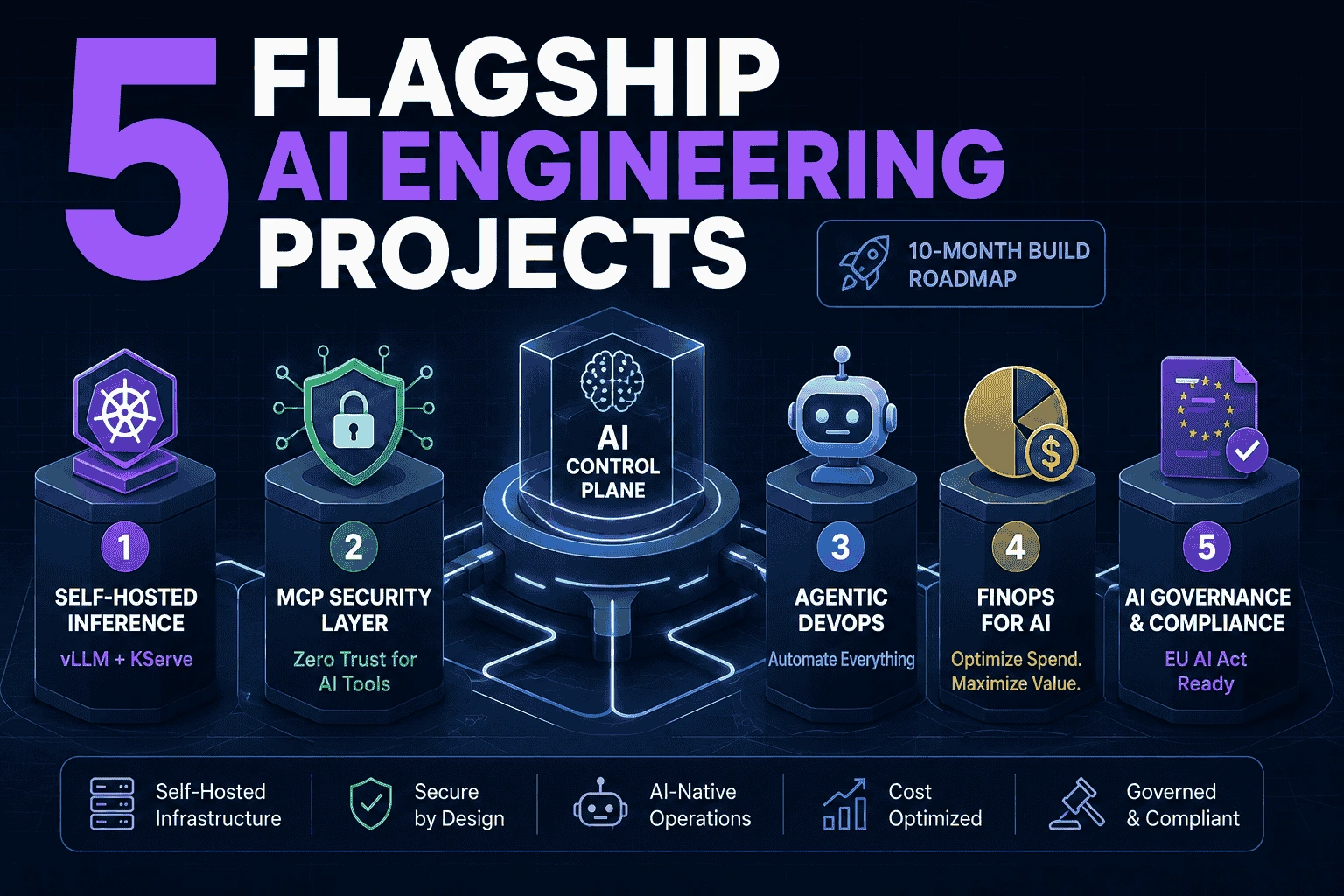
The Control Plane — 5 Flagship Builds, 10 Months
One integrated system, built in 5 pieces. Not 5 toy projects — by the end, “Sentinel” guards “Compass,” “Ledger” meters both, “Nebula” is the infra all of it runs on, and “Aegis” reports on the whole stack. That’s the story you tell in an interview, on Devcrypted, and in an Aicademy case study: “I built and run a real enterprise AI platform, end to end.”
No model training, no math. Everything here is infra, security, orchestration, and governance — your lane. AI tools can help you write code faster; you make every architecture decision.
Pace: 15 hrs/wk × 8 weeks × 5 projects = 10 months. Independent of your existing cert roadmap / 50-project list — tell me later if you want those merged in. Budget: ₹4,000/mo target, ₹6,000/mo hard ceiling. Breakdown at the bottom.
Week 0 — One-Time Setup (Windows 11)
Do this once. Every project below reuses it.
1
2
3
4
5
6
7
8
9
10
11
12
13
14

# PowerShell, as Administrator
wsl --install -d Ubuntu-24.04
# reboot if asked, then open Ubuntu and set a username/password

winget install -e --id Docker.DockerDesktop
winget install -e --id Git.Git
winget install -e --id GitHub.cli
winget install -e --id Kubernetes.kubectl
winget install -e --id Helm.Helm
winget install -e --id Hashicorp.Terraform
winget install -e --id Microsoft.AzureCLI
winget install -e --id Python.Python.3.12
winget install -e --id OpenJS.NodeJS.LTS
winget install -e --id astral-sh.uv
In Docker Desktop → Settings → Resources → WSL Integration, enable Ubuntu-24.04.
Inside WSL2 (wsl from any terminal):
1
2
3
4
5
6
7
8
9
10
11
12

sudo apt update && sudo apt upgrade -y
curl -sfL https://get.k3d.io | bash          # lightweight local Kubernetes
nvidia-smi                                    # confirms GPU passthrough — must list your RTX 3060

# GPU access for Docker containers
curl -fsSL https://nvidia.github.io/libnvidia-container/gpgkey | sudo gpg --dearmor -o /usr/share/keyrings/nvidia-container-toolkit-keyring.gpg
curl -s -L https://nvidia.github.io/libnvidia-container/stable/deb/nvidia-container-toolkit.list | \
  sed 's#deb https://#deb [signed-by=/usr/share/keyrings/nvidia-container-toolkit-keyring.gpg] https://#g' | \
  sudo tee /etc/apt/sources.list.d/nvidia-container-toolkit.list
sudo apt update && sudo apt install -y nvidia-container-toolkit
sudo nvidia-ctk runtime configure --runtime=docker
# then restart Docker Desktop from Windows
Accounts to create now (all free tiers): GitHub, Hugging Face, Azure (pay-as-you-go, set a ₹1,500 spend alert), Anthropic Console + OpenAI platform (small prepaid credit), OpenRouter, Groq.
Repo: one GitHub org, e.g. kamal-control-plane, 5 repos inside it — nebula, sentinel, compass, ledger, aegis. This is your public portfolio from day one — commit as you go, not at the end.
01 — Nebula: Self-Hosted Multi-Model AI Platform
Why: vLLM + KServe + Kueue is the 2026 production consensus stack for serving models on Kubernetes. Building this is you moving your existing AKS/Terraform/GitOps skill straight into the AI layer — “I run our own inference platform, we don’t ship every prompt to a vendor.”
Stack: k3d (local) → AKS burst (advanced), vLLM, KServe, ArgoCD, Terraform, Prometheus + Grafana.
| Phase | Weeks | Tasks |
|---|---|---|
| Foundations | 1–2 | k3d cluster up locally; deploy a quantized 7–8B model (Qwen2.5-7B-Instruct-AWQ or Llama-3.1-8B-Instruct-AWQ — fits your 12GB VRAM) via vLLM in Docker with GPU passthrough; hit it with an OpenAI-compatible API call |
| Kubernetes-native | 3–4 | Wrap it as a proper K8s Deployment + Service + HPA; write the whole thing as Terraform modules (repeatable, destroyable); add liveness/readiness probes |
| GitOps + Observability | 5–6 | Install ArgoCD, deploy Nebula via a Git-synced app; add Prometheus + Grafana for GPU utilization, latency, request rate dashboards |
| Enterprise-scale burst | 7 | Provision a short-lived Azure GPU VM or AKS node pool via Terraform; deploy the full KServe + vLLM stack there (LLMInferenceService CRD); serve a larger model (14B+); tear the burst infra down same day — capture screenshots/metrics as proof |
| Ship | 8 | README with architecture diagram, demo video (local terminal → chat UI hitting your own model), write-up |
Dopamine checkpoint: week 2 — your own model answering a prompt through a curl command, on your own GPU, no API key to anyone. Week 7 — a terraform apply that stands up an enterprise-grade inference cluster on Azure, then terraform destroy before it costs you anything.
Ships as: a working, documented, IaC-defined AI inference platform on your resume — not a tutorial you followed.
Content angle: Devcrypted video — “I replaced OpenAI with my own GPU and Kubernetes.” Strong watch-time topic in 2026.
02 — Sentinel: MCP Security Gateway
Why: MCP is now the standard way AI agents connect to tools (97M+ monthly SDK downloads, adopted by every major vendor) — but as of mid-2026, only ~8.5% of MCP servers actually implement the OAuth 2.1 standard properly, and “MCP Shadow IT” (unauthorized internal servers) is a named, current enterprise risk. Almost nobody has hands-on experience securing this layer yet. You will.
Stack: Python/FastAPI gateway, Open Policy Agent (OPA), OAuth 2.1 (Azure Entra ID app registration), NeMo Guardrails or LLM Guard (open-source, free), Postgres + Grafana for audit trail.
| Phase | Weeks | Tasks |
|---|---|---|
| MCP fundamentals | 1–2 | Stand up 2–3 official MCP servers (filesystem, GitHub, Postgres); connect a client (Claude Code / your own script) directly — see the raw, unsecured baseline |
| The gateway | 3–4 | Build a FastAPI proxy that sits in front of every MCP server; add OAuth 2.1 via Entra ID so every tool call is authenticated per-user; log every tool call (who, what, when) to Postgres |
| Policy + guardrails | 5–6 | Add OPA for tool allow/deny-listing (e.g., “this agent may read GitHub, never write”); wire in NeMo Guardrails or LLM Guard for prompt-injection detection on inbound requests |
| Detection demo | 7 | Write 3 real prompt-injection payloads (indirect, via a poisoned file/doc); show Sentinel catching and blocking them; build a Grafana dashboard of blocked vs. allowed calls |
| Ship | 8 | Architecture write-up, threat model doc, demo video of a live attack being blocked |
Dopamine checkpoint: week 7 — watching a real injection attack hit your dashboard and get blocked in real time, with the log entry to prove it.
Ships as: the security layer for everything else you build — Compass (project 3) will route through this.
Content angle: Aicademy case study / workshop material — this is a genuinely rare, high-value skill in 2026’s job market.
03 — Compass: Multi-Agent Infra Assistant
Why: LangGraph is the 2026 production default for enterprise agent orchestration (largest deployment footprint, built for auditability and rollback — the things regulated environments need). This project turns your own job function — reviewing Terraform, triaging incidents, explaining cost spikes — into an agent system. That’s the single most convincing “I automated part of my own role” story you can put in front of a hiring manager.
Stack: LangGraph (Python), custom MCP servers for Terraform/Kubernetes, official GitHub MCP server, Claude/GPT via cheap-tier models, routed through Sentinel from project 2.
| Phase | Weeks | Tasks |
|---|---|---|
| First agent | 1–2 | Single LangGraph agent: reads a Terraform plan (via a custom MCP server you build), summarizes risk in plain English, posts as a GitHub PR comment |
| Second agent | 3–4 | Kubernetes triage agent: given a failing pod, pulls logs/events (via K8s MCP server), proposes root cause + fix — human approves before anything is applied |
| Multi-agent graph | 5–6 | Wire both agents into one LangGraph graph with a router node; add a checkpoint/human-approval node before any write action (LangGraph’s audit-trail strength) |
| Route through Sentinel | 7 | Point every MCP tool call through your Sentinel gateway from project 2 — now every agent action is authenticated, policy-checked, and logged |
| Ship | 8 | Demo: a real (sandboxed) broken deployment, Compass diagnoses it, you approve the fix, it’s applied — end to end, on video |
Dopamine checkpoint: the first time an agent correctly diagnoses a deliberately-broken pod you threw at it, unprompted.
Ships as: a working agentic DevOps assistant with human-in-the-loop controls — the exact shape enterprises are cautiously trying to adopt right now.
Content angle: Devcrypted series — “I built an AI that reviews my Terraform PRs” is a very shareable format.
04 — Ledger: AI FinOps Platform
Why: 98% of FinOps teams now manage AI spend, up from 31% two years ago — cost governance for LLM/agent workloads is one of the fastest-growing sub-disciplines of platform engineering, and it extends the exact FinOps story already on your resume ($1.4M savings) into the AI era.
Stack: LiteLLM (open-source proxy, self-hosted), Postgres, Grafana, Terraform for the whole stack.
| Phase | Weeks | Tasks |
|---|---|---|
| The proxy | 1–2 | Deploy LiteLLM as a self-hosted gateway; route all LLM calls from Nebula and Compass through it; confirm every call logs token count, model, and cost |
| Attribution | 3–4 | Tag calls by project (Nebula / Compass / test); build a Grafana dashboard: cost by project, by day, by model |
| Cost controls | 5–6 | Configure LiteLLM’s built-in budget caps per project/key; add rules-based model routing (cheap model for simple calls, strong model only when needed) and response caching for repeated calls — all config-driven, no ML needed |
| Anomaly + reporting | 7 | Threshold-based anomaly alert (“spend +50% vs. 7-day average” → Slack/email); export a FOCUS-aligned cost report |
| Ship | 8 | “Before/after” report: what an unmanaged vs. governed AI spend pattern looks like, with real numbers from your own usage |
Dopamine checkpoint: the first budget cap actually firing and blocking an over-limit call — proof the guardrail works, not just logs.
Ships as: a real cost-governance layer with a real, numbers-backed savings story — reuse the “$X saved / Y% reduction” framing that already worked for you once.
Content angle: Aicademy workshop — “AI FinOps” is a title almost nobody can credibly claim yet.
05 — Aegis: AI Governance & Compliance Capstone
Why: the EU AI Act’s high-risk and transparency obligations became enforceable August 2, 2026. Every enterprise running AI in a regulated context now needs an inventory, risk classification, and audit trail — and almost none of them have automated it. This project pulls live data from Sentinel (who accessed what) and Ledger (what it cost, what it did) into one governance layer. It’s the piece that turns “I can build AI infra” into “I can run AI infra the way a regulator would sign off on.”
Stack: Python + Jinja2 (report generation), Open Policy Agent (policy-as-code), small React/Tailwind dashboard (your existing dark-minimal aesthetic), reads from Sentinel’s and Ledger’s Postgres data.
| Phase | Weeks | Tasks |
|---|---|---|
| Inventory | 1–2 | Auto-discover deployed AI systems (Nebula’s models, Compass’s agents) and register them with metadata: purpose, data accessed, autonomy level |
| Risk classification | 3–4 | Build a rules-based questionnaire mapping each system to EU AI Act Annex III categories and NIST AI RMF functions (Govern/Map/Measure/Manage) — policy-as-code via OPA, not ML |
| Evidence generation | 5–6 | Auto-generate technical documentation (Jinja2 → Markdown/PDF) pulling real audit logs from Sentinel and real usage/cost data from Ledger as evidence |
| Dashboard | 7 | A React dashboard: system inventory, risk tier per system, conformity status, one-click “generate compliance report” |
| Ship | 8 | Full walkthrough: register a system, classify it, generate its audit-ready report — end to end, on video. This is your capstone demo reel: all 5 projects, one system. |
Dopamine checkpoint: clicking one button and watching a real, evidence-backed compliance report generate itself from data your other 4 projects actually produced.
Ships as: the capstone. This is what you lead with — “I built and can demo an integrated AI platform: inference, security, orchestration, cost governance, and compliance, wired together.”
Content angle: the flagship Devcrypted long-form video + the Aicademy portfolio’s headline case study.
Budget (₹4,000/mo target, ₹6,000 ceiling)
| Item | Monthly | Notes |
|---|---|---|
| Claude or ChatGPT subscription (coding assistance) | ₹1,700–2,000 | you already use AI tools — this funds that |
| Azure burst GPU VM (a few hrs/month) | ₹500–1,000 | spin up, demo, destroy same day |
| OpenRouter / small API credit (agent calls in project 3) | ₹800–1,200 | cheap-tier models by default |
| Buffer | ₹500–1,000 | domain/hosting you likely already have via kamal.sh |
Everything else — vLLM, KServe, LangGraph, LiteLLM, OPA, NeMo Guardrails, Grafana, Postgres — is open-source and self-hosted at zero cost.